Plavidian Mailing Intelligence™
Mailing Intelligence: Better Data, Smarter Postal Decisions, Verified Production and Delivery Visibility
Plavidian Mailing Intelligence™ is how we use data at each step of the direct mail we produce in Vista, California: a clean address list before anything prints, a postage and entry plan before the job is quoted, camera verification while it runs, and piece-level visibility after the mail enters USPS, and with Plavidian Response™, who responded. Camera verification is an add-on you choose for a job, and the list and postage planning tools are free to try before you talk to anyone.
Five questions, answered in order
- Is the list right? CASS, NCOALink, deduplication, geocoding
- What will it cost and when will it land? Mailing Blueprint, entry planning, in-home dates
- Was every piece produced correctly? camera verification (an add-on), reconciled production report
- Where is it now? piece-level USPS tracking and delivery maps
- Who responded? a personal web address and QR code on each piece (an add-on), counted piece by piece
One connected workflow
Data to proof, one provider
Most mailings cross three or four vendors. Every handoff is a place where a list changes, a piece goes missing, or nobody can say what actually happened. Plavidian runs these steps in one workflow, with one set of records.
-
Choose who gets it
Count households by radius, ZIP, city or district in the Mailing List Builder, or pick carrier routes for EDDM. A list you bring is cleaned with CASS, NCOA and deduplication before anything prints. The Mail Date Planner works the schedule back from the in-home date you want.
- Mailing List Builder Free
- EDDM Route Builder Free
- Mailing Blueprint Free account
- Mail Date Planner Free
Mailing Blueprint Free account 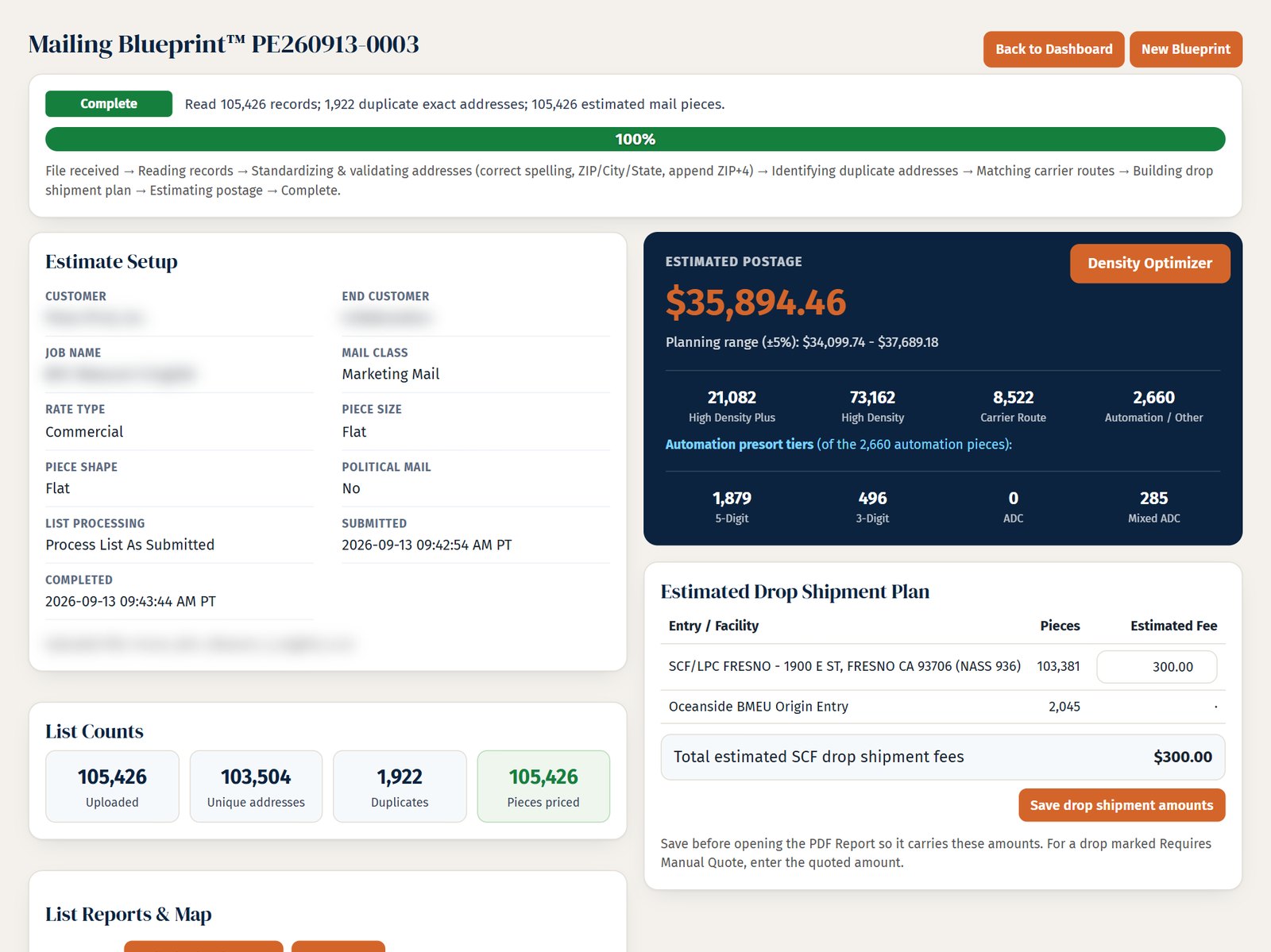
-
Printed and addressed in Vista
Postcards, letters, self-mailers, and booklets, versioned per record, then folded, inserted, tabbed and addressed. Presort, tray and pallet prep and Full-Service electronic documentation follow, then acceptance and drop shipment. Every mailing runs through the same five production steps, written down in the Plavidian Standard.
How mail is prepared: the Plavidian StandardPrint File Check No sign-in 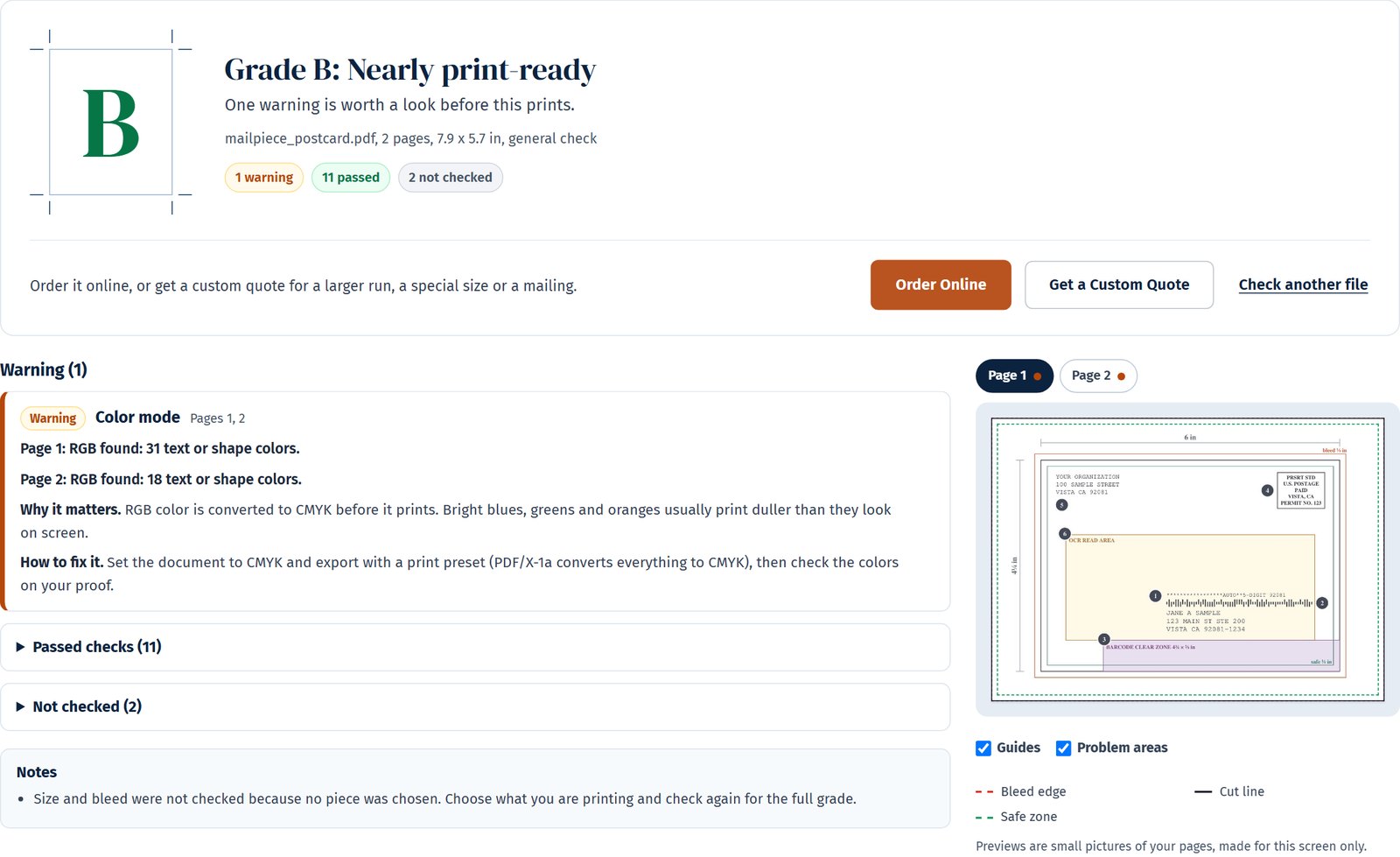
-
Checked as it runs
With Plavidian Sentry, an add-on for letter-size mail, a camera reads each piece as it runs and reconciles it to your list; pieces that fail are diverted for reprint. The Assurance Report documents what was produced and presented to USPS.
How camera verification worksAssurance Report, sample 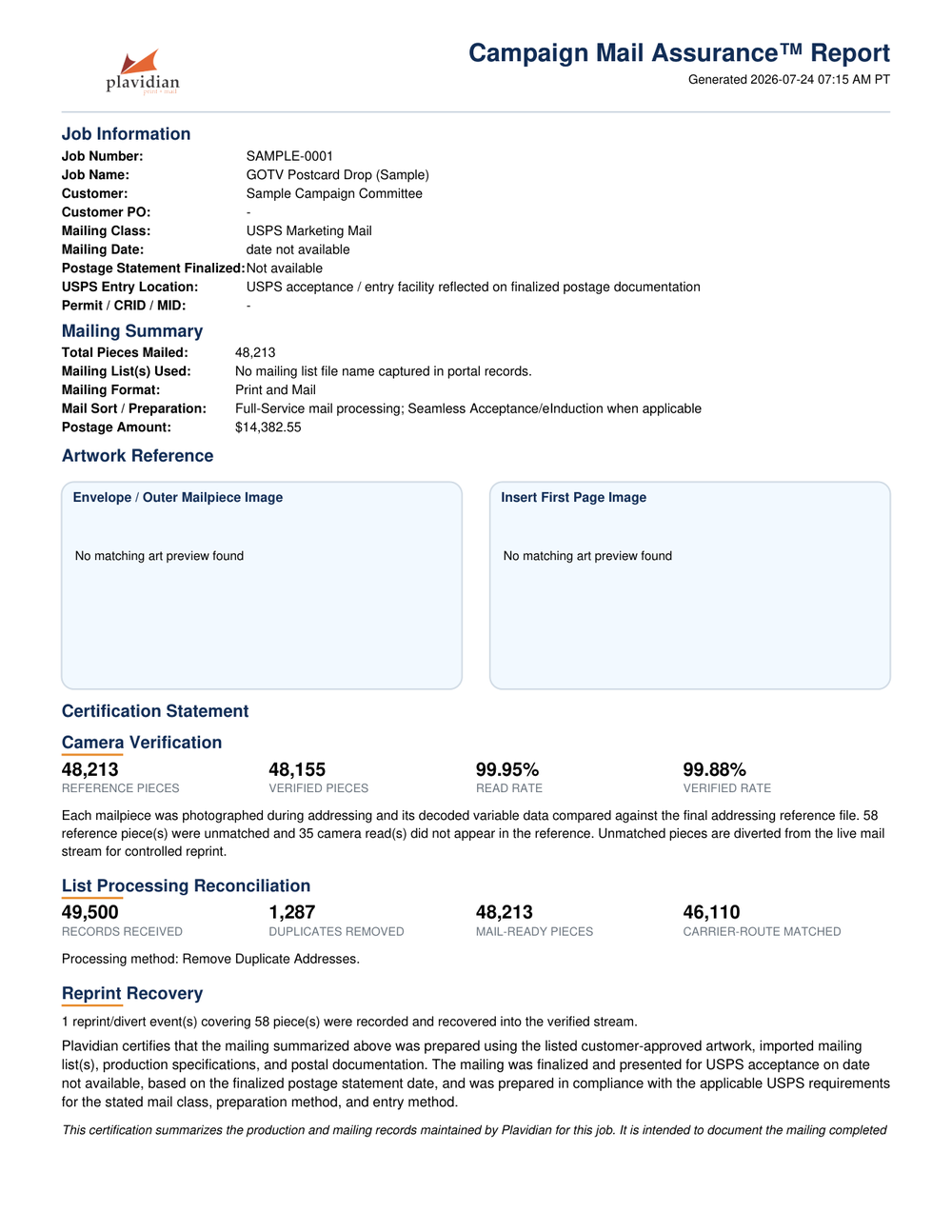
-
See where your mail is
Plavidian Insight is included with every addressed mailing: USPS scan events, a day-by-day delivery curve and delivery maps. The postage statement and the Insight tracking report come with the job. EDDM pieces carry no barcode, so EDDM jobs get the Assurance Report as proof of delivery to USPS.
See Plavidian InsightInsight delivery tracking Included 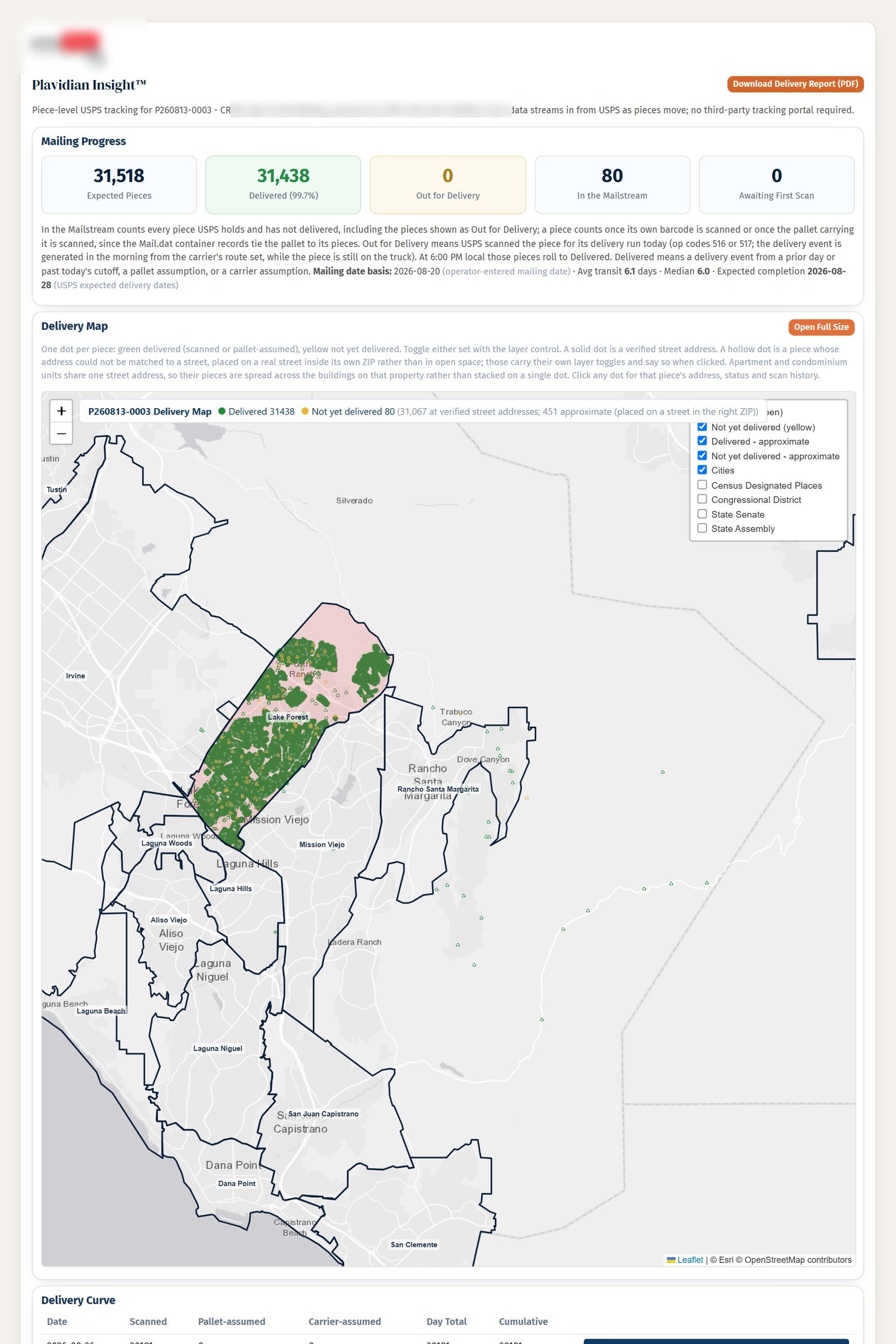
-
See who responded
Plavidian Response, an add-on for addressed postcards, self-mailers and flats, puts a short web address and QR code on each piece and counts visits, scans and form answers by day and ZIP on the job.
See Plavidian ResponseResponse Page builder Add-on 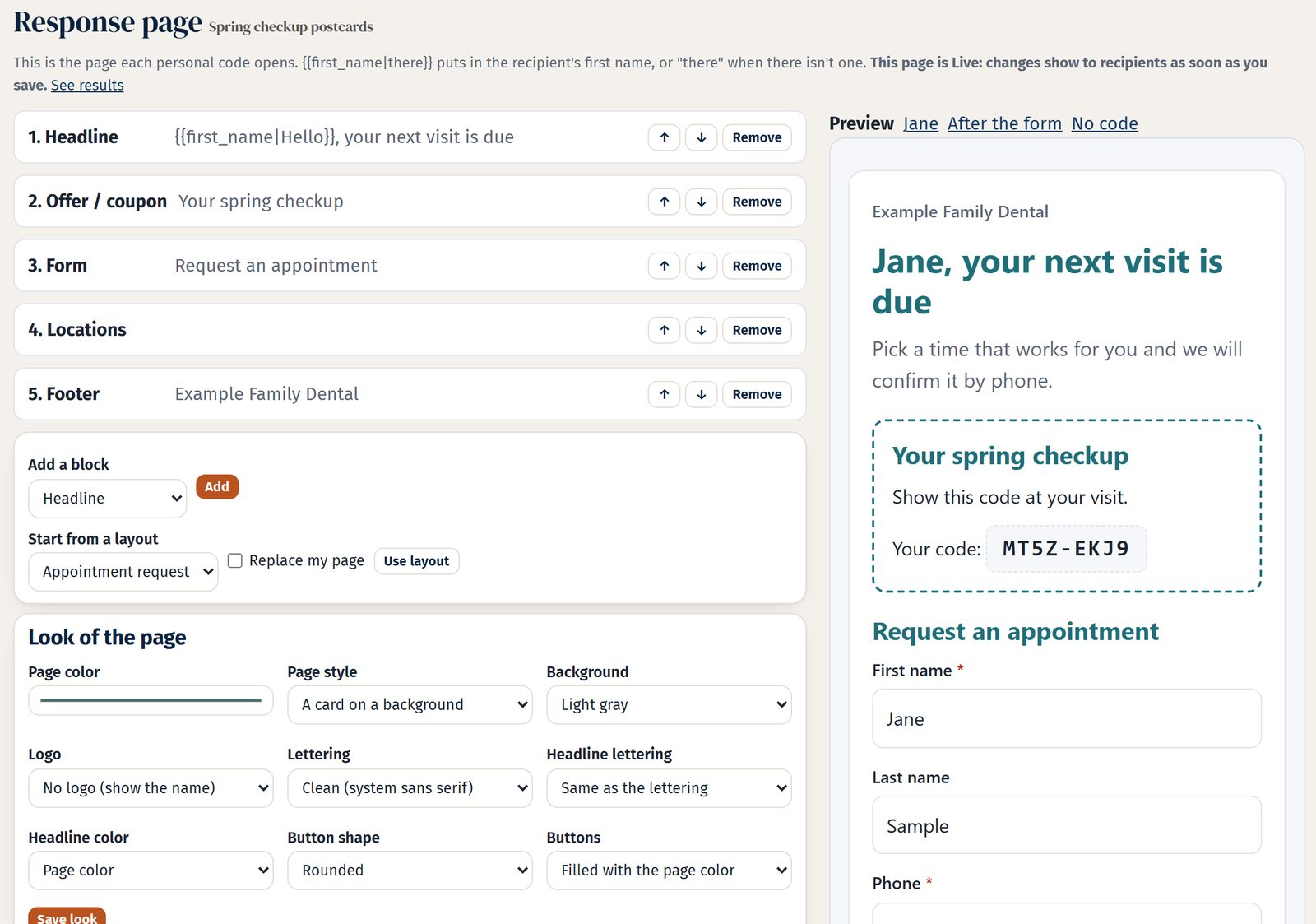


- Since 2008Producing print and mail in Vista, California
- USPS Full-ServiceCertified Mail Service Provider
- Piece-level verificationCamera-read add-on for letter-size mail
- AAPC memberAmerican Association of Political Consultants
- Vista ChamberChamber of Commerce member
-
 PCC memberUSPS Postal Customer Council
1. Plan: better data
Getting the address list right
Addressed production lists get CASS standardization, NCOALink move update and deduplication as applicable before a single piece prints. Clean a list yourself with Address List Cleanup (free account), or have us source and build it through mailing lists and audience targeting.
2. Plan: smarter postal decisions
Postage planning with Mailing Blueprint
Mailing Blueprint™ reads your list and returns the presort makeup, postage priced from USPS Notice 123 with a +/- 5% planning range, a drop-shipment plan and in-home dates, with a downloadable report. It is free with a Plavidian account and takes minutes; the screens here are from a real run.


3. Produce: art, proofs and print
Art built to print and mail
Design the piece free in Plavidian Studio™, get a report on a file you already have from Print File Check (no sign-in), or let Artwork Prepress apply supported fixes (free account). You approve the proof before anything prints, and production follows the Plavidian Standard.
4. Verify: verified production
Add camera verification and every piece is read and matched
Plavidian Sentry™ camera verification, an add-on for letter-size mail, reads the barcode on every finished piece, matches it to your list and diverts anything that does not agree: piece-level verified production, not a sample. The run is reconciled afterwards in a Plavidian Assurance™ report.

5. Track: visibility after entry
Where the mail is, piece by piece
Plavidian Insight™, included with every addressed mailing, follows the USPS scans for each addressed piece and plots them on a delivery map with day-by-day curves. EDDM pieces carry no barcode, so an EDDM mailing gets the Plavidian Assurance™ Report as its proof of delivery to USPS instead. An Informed Delivery campaign adds the USPS digital preview.

6. Results
Know who responded, piece by piece
Plavidian Response™, an add-on for addressed postcards, self-mailers and flats, prints a short web address and QR code for each record. Each code is made from the final mailing list and linked to the Intelligent Mail barcode on its own piece, so scans, visits and form answers are counted against the piece that went out and open from your job page, beside Insight's delivery curve.

One record, followed through
Follow one piece from your list to the response
Each step below records the same identifiers, so the job can show what happened to a single piece instead of leaving you to match four vendors' files afterwards. The record is a sample; the barcode is a real Intelligent Mail encoding with a sample Mailer ID.
Sample record · fictional
Jane A Sample
123 Example Way
Anytown CA 99999-0101
Barcode ID 00 · Service type 700Mailer ID 901234 (sample) · Serial 123456789Routing 99999-0101-01
- 1Plan
The record is cleaned and carried into presort
The address is standardized (CASS), checked for a move when the mailing needs NCOALink, and deduplicated before it goes to presort.
123 EXAMPLE WAY · ANYTOWN CA 99999-0101 - 2Produce
Presort gives the piece its own barcode
The presort run assigns this piece an Intelligent Mail barcode with its own serial number, and the job registers which barcode belongs to which piece.
Serial 123456789 → this piece - 3Verify
The camera reads that barcode on the line Add-on
On letter-size jobs with Plavidian Sentry, the barcode is read as the piece runs and matched to the record it was built from; a piece that does not match is diverted for reprint.
Read 901234 123456789 · matches the record How camera verification works - 4Track
USPS scans come back to the same piece Included
USPS scans arrive keyed to the barcode, so this piece appears on the job's Insight map and delivery curve. EDDM pieces carry no barcode; an EDDM mailing gets the Assurance Report as its proof of delivery to USPS.
Scan · out for delivery · 99999 See Plavidian Insight - 5Results
A response is counted against that piece Add-on
On addressed postcards, self-mailers and flats with Plavidian Response, the short code printed on the piece belongs to the same record, so a QR scan, a visit or a form answer is counted against the piece that went out, beside its delivery scans.
Code on the piece · 1 visit · 1 form answer See Plavidian Response
The platform
One account ties it together
Everything above connects in your Plavidian account: design the piece in the online designer (Studio), free to start with no account, check and fix files in Artwork Prepress, run the free tools, submit the job, approve proofs, watch production and follow delivery - with the same identifiers from list to letter carrier.


Where it matters most
Mailings that cannot afford a guess
- Political mail printing and campaign mail
- Fixed election calendars, multiple versions, voter-file lists and Tag 57 handling - see the political mail case studies.
- Nonprofit fundraising and donor mail
- Where the list is the asset and every undeliverable piece is a lost gift.
- Public and legal notice mailing
- Where you may need to show what was mailed and when, and the reconciled report on a camera-verified mailing is that record.
- Commercial printing and direct mail
- Postcards, letters, self-mailers and catalogs where postage is the largest line on the invoice.
Questions
Frequently asked questions
What is mailing intelligence?
Using data at every step of a mailing to make better decisions and to prove what happened: cleaning and understanding the address list before it prints, planning postage and entry before the job is quoted, reading every finished piece by camera during production on jobs that add camera verification, and following the pieces through USPS scans after they are mailed. Plavidian Mailing Intelligence™ is the name for that whole chain.
Is it an add-on I have to buy?
The planning tools in Plavidian Workbench are free to use before you ever place an order. Camera verification is an add-on you can put on a job for letter-size mail; mailings that carry it close with a signed Plavidian Assurance™ Report. Plavidian Insight™ tracking is included with every addressed mailing. Plavidian Response™, a personal web address and QR code on each piece that counts who responded, is an add-on for addressed postcards, self-mailers and flats.
Do I need to be a customer to use the tools?
No. Plavidian Workbench runs in your browser at no charge. Many tools work without signing in, including the Mailing List Builder, EDDM Route Builder, Mail Date Planner, In-Home Date Estimator, Print File Check and Plavidian Studio; Mailing Blueprint, Address List Cleanup and the Drop Shipment Plan need a free Plavidian account, which also saves your results and carries them into a job.
How is this different from ordinary mail tracking?
Ordinary tracking tells you where a piece went after you handed it over. Mailing intelligence starts before that: a clean list, the right presort and entry plan and, when camera verification is added, every piece verified against its record before it leaves the floor. Tracking comes last, and each step answers a different question.
Which mailings benefit most?
Political and campaign mail on a fixed election calendar, nonprofit appeals where the list is the asset, public and legal notices where the deliverable is the evidence, and any mailing with multiple versions or matched inserts where one wrong piece is expensive.
Related
Go deeper
- Piece-level mail tracking with Plavidian Insight
- Camera verification for letter-size mail (Plavidian Sentry)
- Postage and list analysis with Mailing Blueprint
- Direct mail printing and mailing services
Postal terms on this page: Intelligent Mail barcode, Full-Service, CASS, NCOALink, Seamless Acceptance
Print. Mail. Know More.
Bring us the list, or let us build one. Plavidian plans the postage, shows you the delivery of addressed mail and, as an add-on for letter-size mail, verifies every piece by camera - and you can start with the free tools today.